Frame Selection
It may be desirable not to save all acquired frames to disk. Perhaps certain imaging channels may be relevant only for certain acquisition volumes and ignored for others. Or perhaps the discard frames from a FastZ acquisition is truly not useful. The File Selection feature may be used in these cases where more advanced composition of saved frames may be important, either simply to reduce file footprints on disk, or to provide a basic demultiplexed subset of frame data that may be saved in one or more output files.
Warning
This feature only exists for NI/VDAQ Resonant Scanning modes (Resscan, and RGGScan respectively). Frame selection in Linear Scanning or Line Scanning modes are not currently supported.
Prerequisites and Concepts
Frame selection is only enabled if logging is enabled. When frame logging is enabled, the Frame Selection feature is ignored.
Suffixes
Frame selections partition a stream of frames into multiple files by modifying the file name. These are called file suffixes and serve to identify which file the each frame is being selected to write to. Each file suffix is independent of the other and cannot share channel or frame selections.
File suffixes are assigned in the NI ResScan or VDAQ RGGScan Acquisition object under the FrameSelectFileSuffixList property. Multiple file suffix groups should be specified as a cell array of characters.
Selection Groups
Selecting individual frames per acquisition is memory-inefficient, especially when doing so with a large number of frames. To reduce this inefficiency, frames are selected using selection group which consists of an array of structs with the following format:
struct('StartIndex', [2, 1], 'EndIndex', [Inf, Inf], 'StrideIndex', [2, 2])
The
StartIndexfield indicates the frame index to start the selection group.The
EndIndexfield indicates the ending index. As in the example above, replacing the value withInfis a valid shorthand for indicating that the selection group extends to the end of the acquisition.The
StrideIndexfield indicates the number of output frames to skip between the start index and the end index.
The number of struct groups must match the number of file suffixes. The field values may be scalar or vectors indicating a union of selection groups for, say, special cases where a single set of start, end, or stride indices. In the case where the selection group is represented by vectors, the number of elements in the vector must match across start, end, and stride indices. Selection groups are assigned to the FrameSelectSelectionList property in the NI or VDAQ resonant scanner acquisition objects. For both ResScan (NI) and RGGScan (VDAQ) the fields will be found here: hSI.hScan2D.hAcq.FrameSelectSelectionList.
Averaging
Frame selections operate on raw acquisition frame indices — the same raw frame count that beam power per frame uses. Log averaging is a pixel-value operation applied after frame selection; it does not alter the frame counter. Frame index 3 always refers to the 3rd raw acquired frame regardless of whether averaging is enabled. For assistance in visualizing actual selected frames, see Using the Graphical Viewer.
Channels
Channels can also be selected for frame selection. This feature is orthogonal to the frame selection feature though it operates using a similar syntax.
The FrameSelectChannelIndexList field is a cell array of indices indicating all currently saved channels that should be saved to this file suffix. This field is required and the number of elements within the cell array must equal the number of file suffixes.
Warning
If the channel indices are not specified, no frame data may be saved to file. The exact channel indices must be indicated in order for the frame selection group to properly save the right channels to the file.
Scripting Overview
Editing Selection Groups
The following code adds a file suffix labelled wave_900nm which selects frames 1-4 and all odd frames afterwards. The selection group also select channels 1 and 2 for saving to the file with the suffix wave_900nm.
AcquisitionObject = hSI.hScan2D.hAcq;
AcquisitionObject.FrameSelectFileSuffixList = {'wave_900nm'};
AcquisitionObject.FrameSelectChannelIndexList = {[1,2]};
AcquisitionObject.FrameSelectSelectionList = struct('StartIndex', [1, 3], 'EndIndex', [3, Inf], 'StrideIndex', [1, 2]);
Starting a logging acquisition after running the above script will now generate a file of the form <filestem>_wave_9000nm_00001.tif which only selects the configured groups.
Using the Graphical Viewer
To aide in visualizing the effects of user selections, an interactive graphical interface has been provided which helps indicate which frames of an acquisition will be logged to which file. The following command in the Command Window will open the frame selection graphical viewer:
scanimage.guis.openFrameSelectionWindow();
Warning
The graphical viewer window requires that ScanImage is fully open and that the currently selected scanner supports Frame Selections.
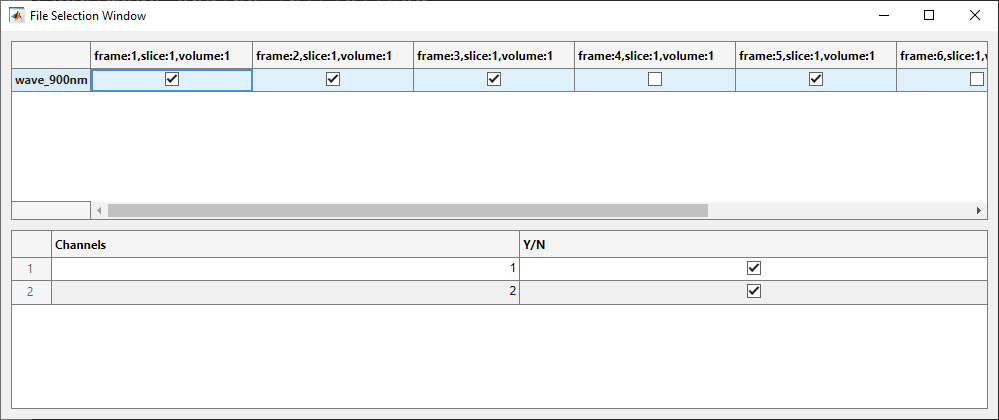
Graphical Viewer Sample
A sample of the frame selection graphical viewer. The settings should match the code from the Editing Selection Groups section
Beam Power Per Frame
In multi-wavelength experiments it may be desirable to switch beam powers on a per-frame basis within a single acquisition volume — for example, alternating excitation wavelengths across depth slices, or directing different laser powers to separate sub-volumes. The Beam Power Per Frame feature allows specifying beam power fractions that override the global power sliders on a per-frame basis.
Configuration
Per-frame beam powers are configured via the hSI.hBeams.powerPerFrameSelectionList property, which is a struct array. Each element defines a set of frame ranges and the beam power fractions to apply when a frame falls within any of those ranges:
hSI.hBeams.powerPerFrameSelectionList = struct( ...
    'StartIndex',     {uint64(1)  }, ...
    'EndIndex',       {Inf        }, ...
    'StrideIndex',    {uint64(1)  }, ...
    'PowerFractions', {[1.0, 0.5]});
StartIndex—uint64vector of frame range start indices (1-based).EndIndex—doublevector of frame range end indices. UseInfto extend to the last frame of the volume.StrideIndex—uint64vector of step sizes between selected frames within each range.PowerFractions— row vector of power fractions in[0, 1], one value per beam in the same order ashSI.hBeams.hBeams.
Multiple ranges that should share the same power fractions (a union) are expressed as vectors of equal length across StartIndex, EndIndex, and StrideIndex. The struct array may contain any number of entries. When entries overlap, the last matching entry wins.
Frames not covered by any entry use the default beam power set by the global power sliders (hSI.hBeams.powerFractions).
Frame Indexing
The frame index k increments from 1 across every depth position traversed in one ScanImage Volume, following the ordering of hSI.hStackManager.zs. For a z-stack with N slices and F frames per slice the volume contains N × F frame indices. Both saved and discarded (e.g. flyback) frames consume indices — the index never resets mid-volume.
Note
When log averaging is active, both beam power frame indices and TIFF file selection indices count raw acquisition frames. Log averaging is applied to pixel values after frame selection and does not shift the frame counter.
Combined Configuration Examples
The following examples show how to configure both powerPerFrameSelectionList and the TIFF FrameSelectSelectionList for common multi-wavelength acquisition patterns. All examples assume hSI.hBeams.hBeams contains exactly two beams — Beam 1 (Wavelength 1) and Beam 2 (Wavelength 2).
Example 1: Normal Case — Alternate Wavelength by Frame
Setup: 4-slice z-stack, 2 frames per slice (8 raw frames per volume). Odd-indexed frames are acquired with Wavelength 1; even-indexed frames with Wavelength 2. Frames are routed to separate TIFF files by wavelength.
% Beam power: odd frames → Beam 1 only, even frames → Beam 2 only
hSI.hBeams.powerPerFrameSelectionList = struct( ...
    'StartIndex',     {uint64(1),   uint64(2)  }, ...
    'EndIndex',       {Inf,         Inf        }, ...
    'StrideIndex',    {uint64(2),   uint64(2)  }, ...
    'PowerFractions', {[1.0, 0.0], [0.0, 1.0] });

% TIFF routing: odd frames → '_wl1', even frames → '_wl2'
AcqObj = hSI.hScan2D.hAcq;
AcqObj.FrameSelectFileSuffixList   = {'wl1', 'wl2'};
AcqObj.FrameSelectChannelIndexList = {1, 1};
AcqObj.FrameSelectSelectionList(1) = struct('StartIndex', 1, 'EndIndex', Inf, 'StrideIndex', 2);
AcqObj.FrameSelectSelectionList(2) = struct('StartIndex', 2, 'EndIndex', Inf, 'StrideIndex', 2);
Example 2: Normal Case — Log Averaging, Alternate Wavelength by Frame Group
Setup: Single-depth acquisition, 8 raw frames, 4× log averaging. Wavelength 1 is used for raw frames 1–4; Wavelength 2 for raw frames 5–8. Both beam power and TIFF file selection use raw frame indices, so the same index ranges apply to both.
% Beam power: frames 1-4 → Beam 1, frames 5-8 → Beam 2
hSI.hBeams.powerPerFrameSelectionList = struct( ...
    'StartIndex',     {uint64(1),   uint64(5)  }, ...
    'EndIndex',       {4,           Inf        }, ...
    'StrideIndex',    {uint64(1),   uint64(1)  }, ...
    'PowerFractions', {[1.0, 0.0], [0.0, 1.0] });

% TIFF routing: frames 1-4 → '_wl1', frames 5-8 → '_wl2'
AcqObj = hSI.hScan2D.hAcq;
AcqObj.FrameSelectFileSuffixList   = {'wl1', 'wl2'};
AcqObj.FrameSelectChannelIndexList = {1, 1};
AcqObj.FrameSelectSelectionList(1) = struct('StartIndex', 1, 'EndIndex', 4, 'StrideIndex', 1);
AcqObj.FrameSelectSelectionList(2) = struct('StartIndex', 5, 'EndIndex', Inf, 'StrideIndex', 1);
Example 3: Alternate Wavelength by Sub-Volume (Arbitrary Stack Definition)
Setup: 8-frame volume with an arbitrary stack definition. Frames 1–3 form Sub-Volume 1 (Wavelength 1); frames 4–5 are discarded for flyback/settling; frames 6–8 form Sub-Volume 2 (Wavelength 2). Each sub-volume is saved to a separate TIFF file.
% Beam power: frames 1-3 → Beam 1, frames 6-8 → Beam 2
% Frames 4-5 are not covered — set global powerFractions = [0, 0] to blank beams
% during the discarded frames, or add explicit zero-power entries below.
hSI.hBeams.powerPerFrameSelectionList = struct( ...
    'StartIndex',     {uint64(1),   uint64(6)  }, ...
    'EndIndex',       {3,           8          }, ...
    'StrideIndex',    {uint64(1),   uint64(1)  }, ...
    'PowerFractions', {[1.0, 0.0], [0.0, 1.0] });

% TIFF routing: sub-vol 1 → '_sub_vol_1', sub-vol 2 → '_sub_vol_2'
AcqObj = hSI.hScan2D.hAcq;
AcqObj.FrameSelectFileSuffixList   = {'sub_vol_1', 'sub_vol_2'};
AcqObj.FrameSelectChannelIndexList = {1, 1};
AcqObj.FrameSelectSelectionList(1) = struct('StartIndex', 1, 'EndIndex', 3, 'StrideIndex', 1);
AcqObj.FrameSelectSelectionList(2) = struct('StartIndex', 6, 'EndIndex', 8, 'StrideIndex', 1);
Tip
To blank all beams during discarded frames, set hSI.hBeams.powerFractions = zeros(1, nBeams) before arming, then use powerPerFrameSelectionList entries only for the active sub-volume frames.
Example 4: Alternate Wavelength by Sub-Volume (Bidirectional Volume Scan)
Setup: 6-frame bidirectional volume scan. Frames 1–3 are the forward scan (Wavelength 1); frames 4–6 are the backward scan in reverse slice order (Wavelength 2). Each direction is saved to a separate TIFF file.
% Beam power: frames 1-3 → Beam 1 (forward), frames 4-6 → Beam 2 (backward)
hSI.hBeams.powerPerFrameSelectionList = struct( ...
    'StartIndex',     {uint64(1),   uint64(4)  }, ...
    'EndIndex',       {3,           Inf        }, ...
    'StrideIndex',    {uint64(1),   uint64(1)  }, ...
    'PowerFractions', {[1.0, 0.0], [0.0, 1.0] });

% TIFF routing: forward scan → '_forward', backward scan → '_backward'
AcqObj = hSI.hScan2D.hAcq;
AcqObj.FrameSelectFileSuffixList   = {'forward', 'backward'};
AcqObj.FrameSelectChannelIndexList = {1, 1};
AcqObj.FrameSelectSelectionList(1) = struct('StartIndex', 1, 'EndIndex', 3, 'StrideIndex', 1);
AcqObj.FrameSelectSelectionList(2) = struct('StartIndex', 4, 'EndIndex', Inf, 'StrideIndex', 1);
Example 5: Arbitrary Frame Pattern
Setup: 7-frame stack (one slice per frame) with a non-contiguous, overlapping wavelength schedule. Wavelength 1 is active on frames 1, 2, 5, and 7; Wavelength 2 is active on frames 4, 5, and 6. Frame 3 is acquired with no beam active. Frame 5 is covered by both entries — the second entry (Wavelength 2) takes precedence. Each wavelength’s frames are routed to a separate TIFF file.
% Beam power: union of non-contiguous ranges per entry
% Entry 1: Beam 1 on frames {1-2} ∪ {5} ∪ {7}  (vector ranges = union)
% Entry 2: Beam 2 on frames {4-6}               (overrides frame 5 from entry 1)
hSI.hBeams.powerPerFrameSelectionList = struct( ...
    'StartIndex',     {uint64([1, 5, 7]), uint64(4)  }, ...
    'EndIndex',       {[2, 5, 7],         6          }, ...
    'StrideIndex',    {uint64([1, 1, 1]), uint64(1)  }, ...
    'PowerFractions', {[1.0, 0.0],        [0.0, 1.0] });

% TIFF routing: Wavelength 1 frames → '_wl1', Wavelength 2 frames → '_wl2'
AcqObj = hSI.hScan2D.hAcq;
AcqObj.FrameSelectFileSuffixList   = {'wl1', 'wl2'};
AcqObj.FrameSelectChannelIndexList = {1, 1};
AcqObj.FrameSelectSelectionList(1) = struct( ...
    'StartIndex', [1, 5, 7], 'EndIndex', [2, 5, 7], 'StrideIndex', [1, 1, 1]);
AcqObj.FrameSelectSelectionList(2) = struct( ...
    'StartIndex', 4, 'EndIndex', 6, 'StrideIndex', 1);
API Reference
TIFF Frame Selection Properties
All three properties are set on the acquisition object at hSI.hScan2D.hAcq. They must be kept in sync: the number of elements in each must equal the number of file suffix groups.
FrameSelectFileSuffixListType:
cell array of charOne character vector per output file group. Each group appends its suffix to the file stem, producing files of the form
<stem>_<suffix>_00001.tif. Set to an empty cell array to disable frame selection entirely.% Enable — two output groups hSI.hScan2D.hAcq.FrameSelectFileSuffixList = {'wl1', 'wl2'}; % Disable frame selection hSI.hScan2D.hAcq.FrameSelectFileSuffixList = {};
FrameSelectChannelIndexListType:
cell array of numeric vectorsOne numeric vector per output file group listing the 1-based channel indices to write to that file. Required — omitting channel indices results in no data being saved to that group.
% Save channel 1 to group 1, channels 1 and 2 to group 2
hSI.hScan2D.hAcq.FrameSelectChannelIndexList = {1, [1 2]};
FrameSelectSelectionListType:
1-by-N struct arrayOne struct element per output file group. Each struct specifies which raw frame indices are routed to that file. All three fields are required and must contain vectors of equal length (a length-1 scalar is equivalent to a length-1 vector).
Field
Type
Description
StartIndexnumeric vector
Range start indices, 1-based.
EndIndexnumeric vector
Range end indices.
Inf= last frame.StrideIndexnumeric vector
Step size between selected frames.
Multiple vector elements within a single struct define a union of ranges. Multiple struct elements in the array correspond to separate output file groups — one per suffix.
% Single group: frames 1, 3, 5, ... (stride 2 from frame 1)
hSI.hScan2D.hAcq.FrameSelectSelectionList = ...
    struct('StartIndex', 1, 'EndIndex', Inf, 'StrideIndex', 2);

% Two groups assigned together
hSI.hScan2D.hAcq.FrameSelectSelectionList = struct( ...
    'StartIndex', {1,   2  }, ...
    'EndIndex',   {Inf, Inf}, ...
    'StrideIndex',{2,   2  });

% Single group with a union of two ranges: frames 1-4 and all odd frames from 5 onward
hSI.hScan2D.hAcq.FrameSelectSelectionList = ...
    struct('StartIndex', [1, 5], 'EndIndex', [4, Inf], 'StrideIndex', [1, 2]);
Beam Power Per Frame Properties
hSI.hBeams.powerPerFrameSelectionListType:
1-by-N struct arrayEach struct element defines a beam power override that is applied when a raw frame index falls within any of the element’s ranges. Elements are evaluated in order; the last matching element wins when ranges overlap. Frames not matched by any element fall back to
hSI.hBeams.powerFractions.Field
Type
Description
StartIndexuint64vectorRange start indices, 1-based.
EndIndexdoublevectorRange end indices.
Inf= last frame of the volume.StrideIndexuint64vectorStep size between selected frames.
PowerFractions1-by-nBeamsdoublePower fraction in
[0, 1]for each beam, ordered ashSI.hBeams.hBeams.Multiple vector elements within a single struct define a union of ranges for that power setting.
% Query beam names to confirm order before setting PowerFractions
cellfun(@(b) b.name, hSI.hBeams.hBeams, 'UniformOutput', false)

% Clear (disable) beam power per frame — all frames use powerFractions
hSI.hBeams.powerPerFrameSelectionList = struct( ...
    'StartIndex', {}, 'EndIndex', {}, 'StrideIndex', {}, 'PowerFractions', {});
hSI.hBeams.powerFractionsType:
1-by-nBeams doubleGlobal default power fractions, one per beam in
[0, 1]. Used for any frame not matched bypowerPerFrameSelectionList, and as the starting point when adding a new entry via the GUI.