Motion Tab
Feature: Motion Correction
Motion Estimator Panel
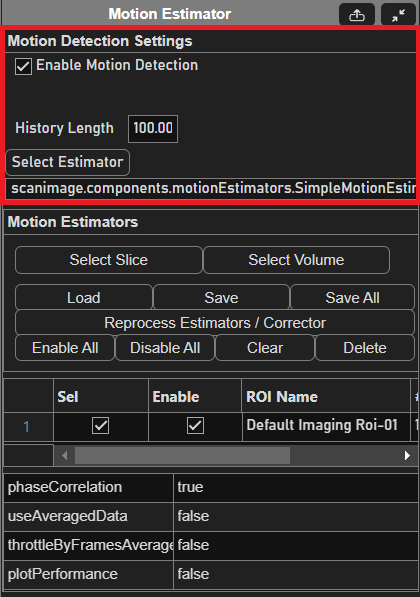
Motion Detection Settings
Element |
Description |
Enable Motion Detection checkbox |
Enables/Disables motion detection. |
History Length |
Sets the number of motion estimate points to be used and stored in memory. |
Select Estimator |
Opens a file dialog in the |
Motion Estimators
Element |
Description |
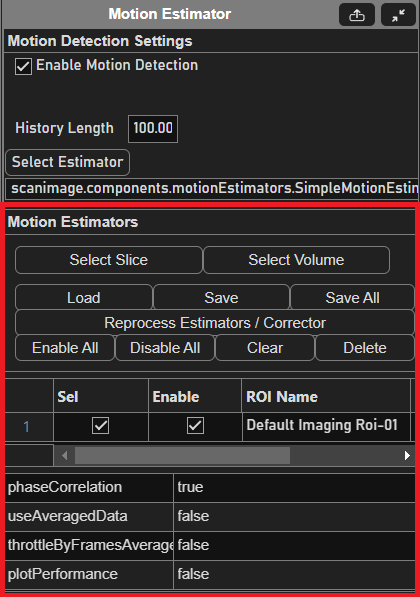
Select Slice |
On click, enables a slice selection tool to select a reference slice to detect motion with. When the tool is enabled, the button will turn green. Hitting |
Select Volume |
On click, enables a volume selection tool to select a reference volume to detect motion with. When the tool is enabled, the button will turn green. Hitting |
Load |
Loads a motion estimation reference from a previously saved file. |
Save |
Saves the selected motion estimator to a file. |
Save All |
Saves all motion estimators to a file. |
Reprocess Estimators / Corrector |
Recreates and reloads all estimators and correctors. Useful when debugging and modifying custom estimator/corrector classes. |
Enable All |
Enables all ROI estimators. |
Disable All |
Disables all ROI estimators. |
Clear |
Clears all estimators. |
Delete |
Deletes the currently selected estimator. |
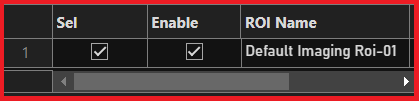
Table Column |
Description |
Sel(ect) |
Selects/deselects the estimator regions of interest. |
Enable |
Enables/disables the estimator region of interest. |
ROI Name |
Name of the region of interest. |
#z |
Number of z slices in the region. |
Motion Corrector Panel
Element |
Description |
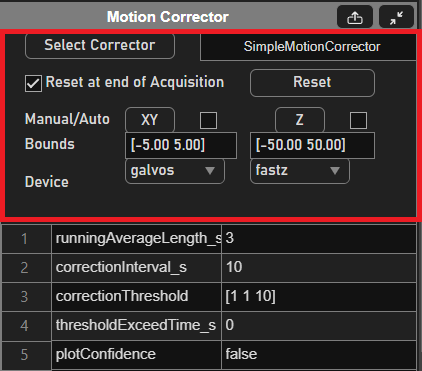
Select Corrector |
Opens a file dialog into the |
Reset at end of Acquisition checkbox |
If enabled, the correction values will reset after each acquisition. This is the equivalent of clicking on the Reset button after an acquisition ends. |
Reset |
Resets all motion correction values to zero. |
Manual/Auto XY | Z |
For each axis button, forces a motion correction event on that axis set (XY or Z). If the paired checkbox is checked, the axes will be corrected at a particular interval as defined by the motion corrector. |
Bounds |
Sets the correction limits of each axis set. The XY axes bounds units are in optical degrees while the Z bounds unit is in microns. Increasing or decreasing these values will increase or decrease the maximum distance of correction whenever a correction event occurs. |
Device |
Selects the hardware device that will be used for correction. |
Simple Motion Corrector Settings

Element |
Description |
Running Average Length |
The averaging window size in seconds used to smooth the motion correction value. |
Correction Interval |
The interval in seconds to wait after each motion correction event. Increasing this value will slow the rate of correction events regardless of sample movement. This field may be tweaked for performance in case the correction calculation is taking too long and throttling MATLAB or other processes. |
Correction Threshold |
Threshold for motion correction in the array format: |
Threshold Exceed Time |
The time window interval in seconds used to determine if a correction is needed when checked. Increasing this value decreases the sensitivity of the corrector as all history values must exceed the designated threshold. |
Plot Confidence |
When set to true, opens a live graph window plotting the confidence interval over time. |
Marius Motion Corrector Settings
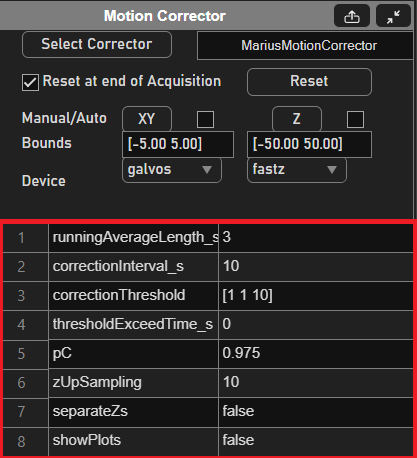
Element |
Description |
Running Average Length |
The averaging window size in seconds used to smooth the motion correction value. |
Correction Interval |
The interval in seconds to wait after each motion correction event. Increasing this value will slow the rate of correction events regardless of sample movement. This field may be tweaked for performance in case the correction calculation is taking too long and throttling MATLAB or other processes. |
Correction Threshold |
Threshold for motion correction in the array format: |
Threshold Exceed Time |
The time window interval in seconds used to determine if a correction is needed when checked. Increasing this value decreases the sensitivity of the corrector as all history values must exceed the designated threshold. |
pC |
Time smoothing factor for the z-correlation. |
zUpSampling |
Upsampling factor for z-correlation. |
separateZs |
If set to true, separates Zs will be used for motion correction. |
showPlots |
If set to true, the correlation, confidence and deltaZ graphs will be displayed. |