Field Curvature Tab
The Field Curvature Tab pairs with the Field Curvature Display GUI in the Auxiliary Panel. This feature uses a fastZ device to correct for the curvature of the FOV.
- Related Documentation:
Example Video
Surface Parameters Gui
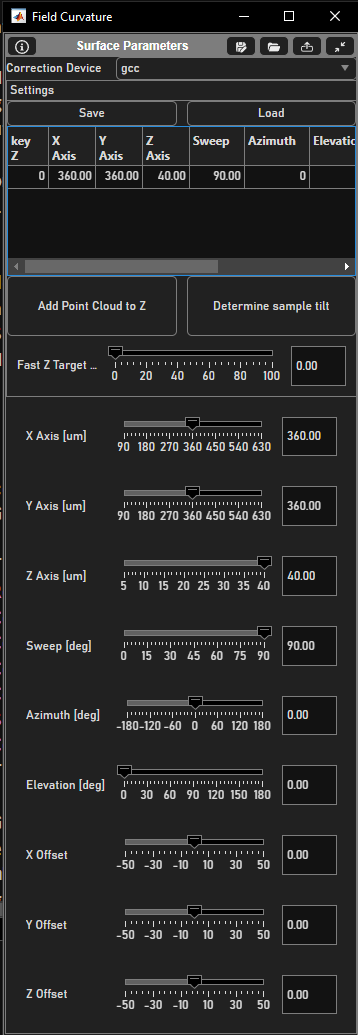
Interface to specify the 3D surface to scan.
Element |
Description |
Correction Device |
The global curvature correction device to configure with this tool. This is not the FastZ, but a separate device managing the actuation of a paired fastZ device |
Save |
Saves the curvature settings of the Correction Device |
Load |
Loads the curvature settings from file to apply to the Correction Device |
Parameter Table |
A list of surface parameters defined at key Zs. Parameters described in subsequent rows here. |
Add Point Cloud to Z |
Rather than using an ideal ellipsoid to determine the surface to scan, one can add a point cloud. There are three ways to add a point cloud:
The point cloud generated surface can then be scaled, offset, and rotated using the surface parameters described in rows below. |
Determine sample tilt |
Tool for determining the tilt of the sample relative to the optical axis of the microscope. This uses the last acquired stack image data at the interface of air and a thin, flat, fluorescent layer to determine the tip and tilt of the optical axis relative to the normal axis of the fluorescent layer. |
FastZ Target [µm] |
The position of the fastZ in the reference coordinate system for which a surface’s parameters are applied in an acquisition. For example, if acquiring at 200 µm relative to the fastZ’s range, and an ellipsoid surface is defined at keyZ = 200, then the fastZ will (attempt to) trace that ellipsoid. |
X Axis [µm] |
The X-component of the size of the surface affecting fastZ actuation with this tool |
Y Axis [µm] |
The Y-component of the size of the surface affecting fastZ actuation with this tool |
Z Axis [µm] |
The Z-component of the size of the surface affecting fastZ actuation with this tool |
Sweep [µm] |
Relevant only for ellipsoid (non-point cloud generated) surfaces. This sets what angular sweep of the ellipsoid is used to generate the surface. |
Azimuth [µm] |
Sets the azimuthal angle of the surface, or the positive rotation about the z-axis (yaw) |
Elevation [µm] |
Sets the elevation angle of the surface, or positive rotation about the y-axes when azimuth is zero (roll) |
X Offset [µm] |
Sets the x-component of the offset of the surface from the reference space origin |
Y Offset [µm] |
Sets the y-component of the offset of the surface from the reference space origin |
Z Offset [µm] |
Sets the z-component of the offset of the surface from the reference space origin |