User Functions
Note
Review the ScanImage® API to learn more about automating ScanImage.
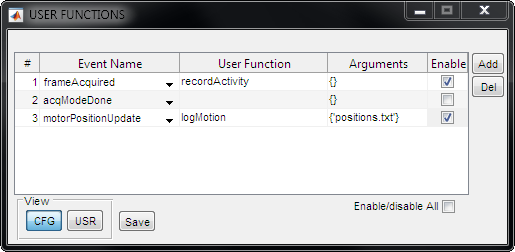
ScanImage supports calling user-defined functions in response to acquisition events.
Controls
GUI Options |
Description |
Function Selection |
Dropdown to select current function. Select the ‘+’ option to add a new blank function. |
Event Name |
Select one of several events of interest occurring before or during an acquisition. |
User Function |
The function to call in response to the event. Note that multiple events can be sent to the same function. |
Arguments |
A cell array with optional arguments to pass to your user function. |
Enable |
If this is checked, the user function will be called when the event is triggered. |
Delete |
Delete the currently selected user function. |
User Function Definition
A user function has the format:
function name(source,event,arguments)
Argument |
Description |
source |
The UserFunction Class. You can access the root SI object by accessing the source’s hidden property `hSI` (src.hSI). |
event |
A MATLAB EventData Class |
arguments |
A cell array with optional parameters. |
Example
 1function myUserFcn(src,evt,varargin)
 2   % in myUserFcn.m somewhere on the matlab path.
 3
 4   disp(['Got Event: ' evt.EventName]); % prints the event
 5   disp(src);                           % prints the source object (UserFunctions)
 6   disp(src.hSI);                       % each source object has access to the main
 7
 8   disp(src.hSI.hScan2D)                % ScanImage® imaging system object for
 9                                        % methods and property access
10end
Events
Acquisition triggers are triggers used for controlling the start and end of aquisitions. An acquisition mode is a noteable event that happens during acquisition.
General Events
These events are generalized to acquisitions (FOCUS, GRAB, or LOOP).
Event |
Description |
acqModeStart |
Called just before the start of a GRAB or LOOP. This may happen before any data is acquired. |
acqModeDone |
Called just after the last frame at the end of a GRAB or LOOP. |
acqStart |
Called just after the first frame is acquired. |
acqDone |
Called just after the last frame gets acquired. |
acqAbort |
Called just after an acquisition is aborted. This is usually triggered from the Abort button. |
sliceDone |
Called just after the shutter is closed after acquiring a slice during a acquisition. |
focusStart |
Called just after the user presses the FOCUS button. |
focusDone |
Called just after the FOCUS is aborted. Similar to acqAbort, but only in FOCUS mode. |
frameAcquired |
Called just after a frame is acquired. |
overvoltage |
Called when the digitizer experiences an overvoltage condition during an acquisition. |
Photostimulation-module Events
User functions can also be triggered from doing photostimulation-related events.
Event |
Description |
onDmdStimStart |
Fires when command to perform an On-Demand stim is received, before the trigger is sent. |
onDmdStimSingleComplete |
Fires when an On-Demand stim completes if multiple outputs are allowed; more stims can be externally triggered. |
onDmdStimComplete |
Fires when an On-Demand stim completes if multiple outputs are not allowed; no more stims will occur until next On-Demand command. |
onDmdStimExtSel |
Fires when an external On-Demand stimulus selection occurs. |
seqStimStart |
Fires when a Sequence stimulation begins. |
seqStimAdvance |
Fires when a Sequence element is complete and Sequence advances to the next stim. |
seqStimSingleComplete |
Fires when a single Sequence is complete. |
seqStimComplete |
Fires when the last Sequence is complete. |
photostimAbort |
Fires when photostimulation module aborts. |