Generating a ScanImage® Report for Issue Submission
Make sure ScanImage® is in your Matlab path.
Start ScanImage® with the MDF, configuration, and layout files used when encountering the error.
Replicate the conditions that lead to the error.
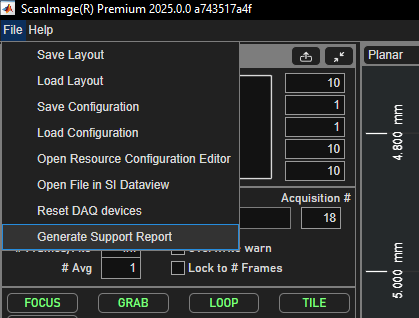
Generate a report as shown in the image above, this process may take some time.
Attach the file SIReport.zip generated in your ScanImage® directory to your support ticket.
Note
If your issue prevents ScanImage® from successfully starting. A partial demo can be generated by calling the following command in the matlab command window:
>> scanimage.util.generateSIReport()